Tools to Try
Use What Works. Just Use It Intentionally. The Wheel of Work isn’t a new tool — it’s a new way to use your
existing tools.
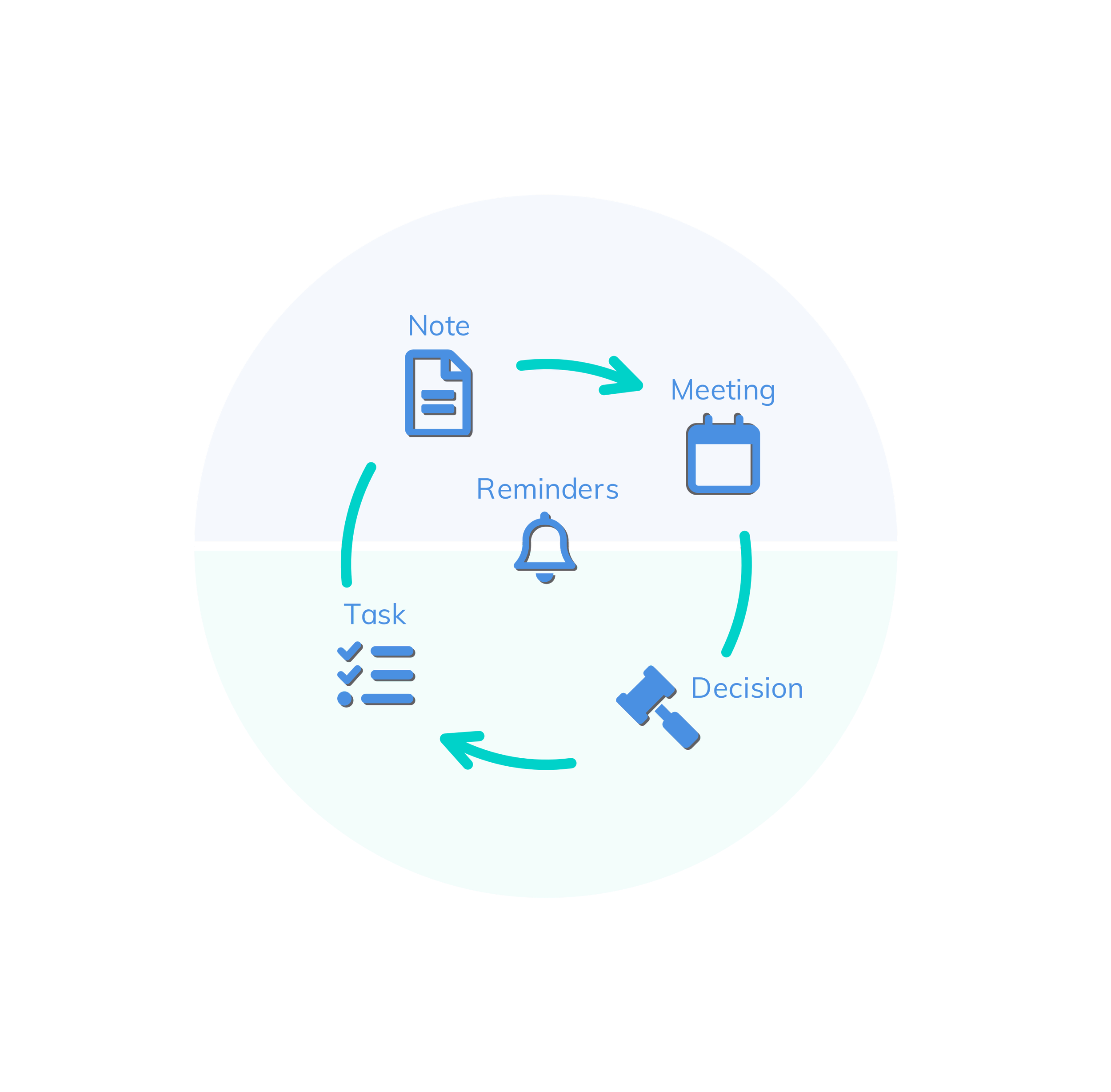
Whether you’re a sticky note lover, a calendar power user, or a digital minimalist, the goal is the same: make your creative flow visible, structured, and repeatable. Here are tool suggestions aligned with each action in the Wheel of Work:
Note it: Capture ideas, thoughts, info.
Tools Examples:
● Notion / Evernote / Apple Notes – Flexible idea capture
● Voice memos – Great for when ideas strike on the go
● Paper notebooks – Still magic for some minds
AI Powered:
● Notion AI: generate content, summarize notes, and answer
questions
● Otter.ai: transcribing audio
● Fireflies.ai: automates transcription and summarization
● Evernote: integrated AI to improve its capabilities
● Mem: focuses on organization and retrieval
Tip: Always tag notes with a date, topic, and a key phrase.
Share it: Bring others in. Collaborate early.
Tools Examples:
● Slack / Teams / WhatsApp – For quick back-and-forths
● Webex / Zoom – Share and explain complex ideas visually
● Google Docs – Real-time collaboration and idea shaping
AI Powered:
● Miro AI: visual brainstorming and ideation
● MindMeister: AI enhanced mind-mapping tool
● Beautiful.ai: idea-sharing process for presentation.
● Team-GPT: leverage generative AI models like ChatGPT for brainstorming.
Tip: Share before things are “done” — clarity grows through feedback.
Decide it: Make choices and set direction.
Tools Examples:
● Decision logs in Notion or OneNote
● Team Kanban boards (Trello, Jira, Asana,)
● Whiteboarding tools (Miro, FigJam, Webex)
AI Powered:
● Microsoft Power BI: uses AI to find patterns and generate insights
● Tableau : data visualization and business intelligence tool.
● IBM Watson: risk assessment, fraud detection, and creating predictive models
● DecisionEngine AI: assessing potential risks and evaluating scenarios
● Rationale: structured decision-making
Tip: Write down decisions, who made them, and why. That’s leadership memory.
Do it: Execute. Deliver. Get it done.
Tools Examples:
● Calendar timeboxing (Google or Outlook)
● Task managers (ClickUp, Todoist, Asana)
● Focus apps (Pomofocus, Forest)
AI Powered:
● Motion: analyzes tasks, deadlines, and priorities and creates an optimal schedule
● Zapier: workflow automation with AI integrations for a powerful task execution tool.
● Wrike: work management platform. AI to automate repetitive tasks, improve collaboration, and provide predictive analytics.
● Asana: combines visual project tracking with smart, AI-powered assistance.
● ClickUp: AI generates subtasks, summarizes lengthy threads, and find information across all integrated apps.
Tip: Block time for tasks — don’t let meetings eat your doing time.
Remind it: Nudge yourself to follow through.
Tools Examples:
● Digital reminders (Todoist, Apple Reminders, Google Tasks)
● Post-its on your screen (yes, really)
● Recurring events in your calendar
AI Powered:
● Motion: AI to create and adjust your daily schedule, including reminders. Intelligently plan your day.
● Todoist: integrated AI to enhance its functionality
● Reclaim.ai: AI-powered calendar assistant that focuses on optimizing your time
● Any.do: Any.do combines a to-do list, calendar, and smart reminders into one app.
● Microsoft To Do: "My Day" feature uses AI to learn habits and recommend tasks to complete each day
Tip: Review your reminders twice daily. Morning = plan. Evening = reset.
“The best tools are the ones you actually use — consistently and with purpose.”
Tools, Trademarks & Legal Notice
This book and it’s Web links references third-party tools, software platforms, and services for educational and illustrative purposes only. All product names, logos, brands, and trademarks are the property of their respective owners. Their inclusion does not imply endorsement, sponsorship, or affiliation with the author or publisher.
Product descriptions reflect general publicly available functionality at the time of writing and may change without notice. Readers should consult the official documentation of each product for current features, terms, and usage.
Third-Party Tools Referenced
The following tools are mentioned throughout this book as examples of how creative work can be supported across different stages of thinking, collaboration, decision-making, execution, and follow-through.
- Notion®, Notion AI® - Notion Labs, Inc.
- Evernote® - Evernote Corporation
- Apple Notes®, Voice Memos®, Apple Reminders® - Apple Inc.
- Otter.ai® - Otter.ai, Inc.
- Fireflies.ai® - Fireflies.ai, Inc.
- Mem® - Mem Labs, Inc.
- Slack® - Slack Technologies, LLC (a Salesforce company)
- Microsoft Teams®, OneNote®, Power BI®, Outlook®, Microsoft To Do® - Microsoft Corporation
- WhatsApp® - WhatsApp LLC (a Meta Platforms company)
- Webex® - Cisco Systems, Inc.
- Zoom® - Zoom Video Communications, Inc.
- Google Docs®, Google Calendar®, Google Tasks® - Google LLC
- Miro®, Miro AI® - Miro, Inc.
- FigJam® - Figma, Inc.
- MindMeister® - MeisterLabs GmbH
- Beautiful.ai® - Beautiful Slides, Inc.
- Team-GPT® - Team-GPT, Inc.
- Trello®, Jira® - Atlassian Pty Ltd
- Asana® - Asana, Inc.
- Tableau® - Salesforce, Inc.
- IBM Watson® - International Business Machines Corporation
- DecisionEngine AI®, Rationale® - trademarks of their respective owners
- ClickUp® - Mango Technologies, Inc.
- Todoist® - Doist Inc.
- Pomofocus® - trademark of its respective owner
- Forest® - Seekrtech Co., Ltd.
- Motion® - Motion Labs, Inc.
- Zapier® - Zapier, Inc.
- Wrike® - Wrike, Inc.
- Reclaim.ai® - Reclaim.ai, Inc.
- Any.do® - Any.do Inc.